
SEO Migrations For Enterprise: How To Plan, Execute And Assess A Site Migration
SEO
SEO Migrations For Enterprise: How To Plan, Execute And Assess A Site Migration

 ChatGPT
 Claude
 Perplexity
 Grok
Grok
 Google AI
 You
You
 WhatsApp
 LinkedIn
Going into a migration, it’s easy to be optimistic. Crawl the live site, crawl the staging site, build the URL map, monitor the results. Four steps, how hard can it be?
In reality it’s almost the opposite. Content isn’t ported over correctly. The client doesn’t whitelist your IP. And changes get made up to the very last second, so the URL map you spent a week on is already out of date by launch day.
I recently presented on this at the Sydney SEO Collective, drawing on an enterprise migration my team and I delivered this year: two ecommerce domains and three brands merged onto a single fresh domain, alongside an IA rebuild, a redesign, and a Google Merchant Center consolidation. This post is the written version of that talk. It applies to enterprise sites, but the principles hold for a migration at any stage of a business.
Key Takeaways
- Every variable you add to a migration (domain, CMS, design, IA) multiplies risk rather than adding to it, so stagger changes wherever you can.
- Agree on the objective, how success is measured, and who decides if it was a success before any work starts.
- Reverse engineer every deliverable from the go-live date, and plan the rollback before you need it.
- Execution runs across three assets: the current website, the staging site, and the connection layer (the redirect map) between them.
- Build the redirect map late, and lock in an update halt period so URLs stop moving while you implement it.
- Set aside the entire go-live day, with separate task lists for the SEO, the developer, and the client.
- Assess against your pre-migration benchmarks, watch GSC indexing closely, and roll anything that didn’t make launch into a phase two plan.
The Main Types Of SEO Migrations
Most migrations fall into one of five buckets, and at enterprise level you’re rarely dealing with just one.
- Domain migration: Moving from one domain to another, usually driven by a rebrand. It needs a thorough redirect map alongside the standard checks.
- HTTP to HTTPS: Less common today, as almost every modern site launches on HTTPS.
- CMS migration: Often happens when a business scales into an enterprise platform (such as AEM), or when a new marketing manager brings a platform preference with them (such as WordPress to HubSpot).
- Site redesign: Can happen on its own, but usually lands alongside a CMS change or a full rebrand.
- IA rebuild: I classify this as a migration because it changes the structural foundations of the website, and it’s often paired with a CMS or domain change.
Why Every Extra Variable Multiplies Your Risk
The flawed assumption is that migration risk is additive. An IA change, a CMS change, a domain change, and a content change each carry some risk, so you add them up: 2 + 2 + 2 + 2 = 8.
In practice the variables compound. The same four changes behave more like 2 × 2 × 4 × 2 = 32, with the domain change doubling up because it touches everything else. That’s four times the risk you thought you were taking on.
The bigger problem is diagnosis. If you change everything at once and traffic drops, it’s almost impossible to isolate which variable caused it. Wherever the business allows it, stagger the changes.
The Enterprise Migration Behind This Talk
On the surface, the scope of our project was already big:
- A full information architecture overhaul
- Two domains and three brands merged into one fresh domain
- A website redesign and complete content overhaul
- Two GMC accounts and four data sources merged into one account and Merchant API feed
Below the surface was where the real complexity sat. The launch landed three weeks after EOFY. We were coordinating across three agencies.
On top of that, two weeks out from launch the staging site was crawling at 106,206 URLs, the vast majority of them crawl budget waste. Working with the in-house developer, we got that down to 10,502 crawled URLs before go-live without losing a single commercial page.
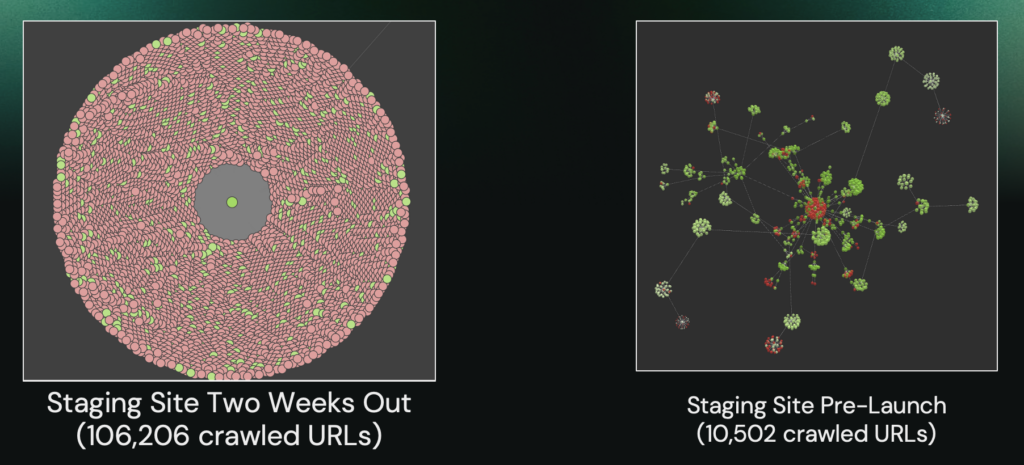
That IA clean-up is a talk in itself, so I’ve written it up separately with a walkthrough video: How To Optimise Shopify Information Architecture With Claude.
The Results
We forecast a 30% drop in traffic for the first three months, based on benchmarks from the brand’s US market. Here’s where we landed:
- 75% of pre-migration clicks within 60 days, and still building. That comparison is skewed downwards, because the pre-migration period included EOFY and Prime Day traffic.
- 86% of the year-on-year baseline across both old domains. Comparing against the same period last year filters out that seasonal spike, and puts us 16 points ahead of the 70% forecast, with a month of the forecast window still to go.
Migrations Are A Team Effort
None of this was a one-person job. Valerie handled all the GMC activities. Benji ran the day-of checks, the content audit, and the UI initiatives. Amii owned everything on the content side, including the product page templates. I handled the technical checks and the IA optimisations.
Migrations Are More Than A Checklist
There are plenty of migration checklists out there. What I want to cover is the principles behind them, with enough process to put them to work. I break every migration into three stages:
- Defining and planning the objective
- Executing the objective
- Assessing the objective
Stage One: Defining And Planning
What Is Your Objective?
This is where you align with the client on what the migration is actually for. The questions I work through:
- What’s the point of the migration?
- How will we measure success?
- What are the priorities, and are they implicit or explicit?
- Are any of them competing with one another? (“Change everything all at once and lose no traffic” is a classic.)
- Who will ultimately decide whether it was a success?
That last one matters more than people expect. If the person signing off on success isn’t in the kickoff call, you’re working towards a target you haven’t seen.
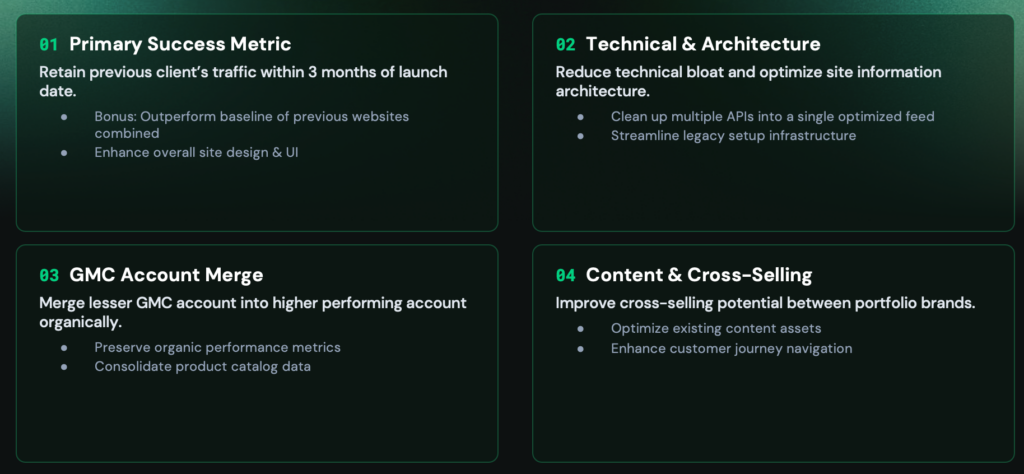
For our client, the objectives were:
- Primary success metric: Retain the previous sites’ traffic within three months of launch, with a bonus goal of outperforming the combined baseline and improving the overall design and UI.
- Technical and architecture: Reduce the technical bloat of the previous sites and optimise the information architecture.
- GMC account merge: Merge the lesser GMC account into the higher performing one organically, preserving performance metrics and consolidating product catalogue data.
- Content and cross-selling: Allow cross-selling between the brands on a single domain, optimising existing content assets and customer journey navigation.
Building Your SEO Migration Plan
Your migration plan needs to answer four things:
- Roles and ownership: Who is responsible for which action points, and by when?
- Pre-migration benchmarks: Do you have GSC traffic, GA4 organic data, keyword positions, and share of voice against competitors locked in?
- Rollback strategy: What’s the plan if it all falls apart? Lay it out in advance so you’re not making decisions under pressure.
- Go-live and phasing: When are you going live? Ideally in a slow retail period, and rolling out to lesser markets first so you can apply the learnings to priority markets.
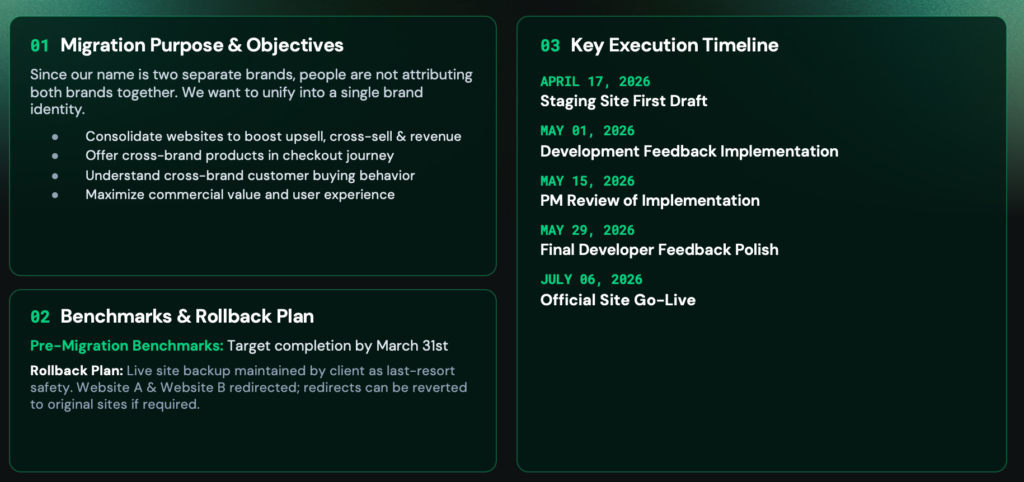
Our plan opened with the purpose in plain English: because the business ran two separate brands, people weren’t attributing both brands together, and the goal was one unified brand identity that could lift upsell, cross-sell, and revenue. Benchmarks were due by the end of March. The rollback plan was a live backup of both old sites maintained by the client, so the redirects could be reverted to the original sites if required.
Reverse Engineer Your Deliverables From The Go-Live Date
Once the go-live date is set, work every deliverable backwards from it. Our key execution timeline ran from a first staging site draft in mid-April, through development feedback and implementation in May, to a final developer polish at the end of May and go-live in early July. The SEO deliverables sat underneath that:
| Due | Deliverable |
|---|---|
| 31 March 2026 | Schema optimisations |
| 30 April 2026 | Hreflang recommendations |
| 30 April 2026 | Migration URL mapping |
| 29 May 2026 | Staging site internal links and IA recommendations |
| 29 May 2026 | Staging site content audit |
| 30 June 2026 | Migration go-live final checks |
Bonus Tips From Lessons Learned
- Go live early in the week. Monday to Wednesday gives you the rest of the week to fix whatever breaks.
- Keep one centralised tracking document. Put every recommendation and implementation in one place so nothing gets lost across emails and Slack threads.
- Pick a low traffic, low commercial period. And if you have multiple markets, launch the lower priority ones first.
- Get involved early in template builds. Collection page internal linking logic and product page templates are far easier to shape before they’re built than after. Budget time for it if you can.
- Stagger major changes. Change the IA, then the design, then the CMS, then the domain. Changing everything at once makes it almost impossible to isolate the variable behind a traffic drop.
Stage Two: Execution
With the plan agreed, execution needs to be managed across three key assets:
- The current website(s): Crawl and benchmark the existing sites to inform the new architecture, the redirect map, and the content audit.
- The staging site: Audit it thoroughly for technical and content issues before it goes anywhere near launch.
- The new website go-live: Execute the launch tasks, tracking configurations, and domain changes.
The redirect map is the connection layer that joins the first and third together.
The Current Website
The current site is your benchmark and the source of truth for your redirect map. My audit process:
- Crawl setup and storage: Crawl the site in database mode in Screaming Frog so you can store the crawl and compare it later. Store structured data and hreflang for reference, and plan a re-crawl if the site updates significantly before launch.
- API integrations: Connect GSC (clicks, impressions, rankings, CTR), GA4 (conversions and traffic), and PageSpeed Insights to get your speed baseline.
- URL and link audit: Pull the most highly trafficked and linked pages from GSC and Ahrefs. Include non-canonical URLs such as product variants or faceted navigation if they have traffic or backlinks.
The Staging Site
This is where you want to dot every i and cross every t before anything goes live.
- Access and crawl setup: Get the login and password credentials, and have your IP whitelisted. Override the robots.txt if it’s disallowed, and override noindex tags too, otherwise Screaming Frog won’t give you any insights.
- Crawl prep and storage: Crawl in database mode, store structured data and hreflang, and run your regular technical audit. There’s no CrUX data on a staging site, so you can skip PageSpeed.
- Compare and draft the URL map: Use compare mode against the live site crawl to spot structural, metadata, and link changes. You can get a draft redirect map from custom regex on page paths, plus near duplicate or embedding matching.
Plan Your Go-Live Robots.txt
Write the robots.txt directives the new site will launch with. Include your parameter URLs and anything else you need to manage crawl budget. Test it with Screaming Frog’s custom robots.txt feature against the staging crawl first, so you don’t accidentally disallow critical URLs. Then present it to the client to upload the moment the site goes live.
Conduct A Content Audit Of The Staging Site
If time permits, audit the content on staging:
- Check the content has been ported over correctly, including formatting, media, and key page elements.
- Use performance data from the live site (GSC and Ahrefs) to decide what gets redirected, merged, purged, or refreshed, and feed those decisions into the URL mapping.
- Anything that can’t go live before launch gets planned into a phase two on the other side, rather than delaying the go-live.
The Connection Layer: Your Redirect Map
The redirect map is what connects the old domain to the new one.
- Pull every URL. Use a crawl, a CMS plugin export, or the XML sitemaps. Include pages, images, PDFs, and any other asset that drives traffic.
- Use clean 301s. No chains, no loops, and watch case sensitivity so you don’t create 404s.
- Redirect to semantically related pages. Don’t pump everything to the home page. And be precise: a replacement part shouldn’t redirect to the product it belongs to.
- Prune what isn’t worth keeping. Low-value pages with no traffic can be served a 410, and related thin pages can be merged into one main hub.
- Build it late. Clients make changes right up to the last minute, so implement the map later in the process.
- Set an update halt period. Agree on a window where URLs stop changing, so you have time to implement the map properly without chasing moving targets.
Don’t Forget Your Images
Images can bring in considerable traffic in a lot of niches. Map your image URLs with 301s, update image paths in media libraries and CDN setups, and make sure you’re not left with broken images on migrated pages. That protects your Google Images rankings and the backlinks pointing at hosted images.
The Deployment
Set aside the entire day. Go-live is a coordinated effort, so agree a delegation framework between you, the developer, and the client ahead of time.
Day-Of Tasks For The SEO
- Crawl the live site. Check robots.txt, nofollow and noindex tags, canonicals, and hreflang. I’ve seen sites go live with canonicals still pointing at the staging domain.
- Validate links and rendering. Internal links should point at the new domain, not the old redirected one, and JavaScript should render as expected.
- Check tags are firing. Confirm GSC, GA4, and GTM are all working.
- Check GSC for issues. Look for manual actions or removal requests carried over from the old account.
- Annotate. Add the migration date to GA4, GSC, and any other tracking platforms.
- Test every redirect. Crawl the old URLs in Screaming Frog list mode against your redirect map.
- QA on mobile. Test on an actual phone, and check across browsers, because things can break on individual browsers too.
Day-Of Tasks For The Developer
- Update the DNS settings to point to the new IP address.
- Temporarily lower the DNS TTL for faster cache refreshes, and revert it after a few hours.
- Remove the site blocks: password protection, noindex tags, and the staging robots.txt.
- Implement all the redirects, including 410s for URLs that aren’t migrating.
- Set up the GSC and Bing Webmaster Tools profiles, including XML sitemaps.
- Submit the change of address in GSC (this needs owner permissions).
Day-Of Tasks For The Client
- Update all social profiles, Google Business Profile links, business directories, and ad destination URLs.
- Reach out to the highest authority backlinks and ask them to update the link directly, so that equity doesn’t have to pass through a redirect.
- Publish a blog post announcing the change and explaining the move.
- Keep renewing the old domain. It preserves your redirect equity and stops competitors or bad actors from registering it.
Stage Three: Assessing
Once the site is live, the job shifts to monitoring the new domain’s performance and fixing issues early.
Measure Performance Against Your Objectives
Build a thorough post-migration report with all the typical metrics, compared against your pre-migration benchmarks. I use Looker Studio with a merged data source that blends the old and new GSC properties, so you can see the crossover in one view. Break it down by device, top countries, and content type (collections, products, blogs), and add brand-level revenue if you’ve merged brands.
Alongside the report, keep ongoing tabs on:
- Rankings: Keyword position stability and URL mapping movements.
- Traffic: Organic sessions and user acquisition channels.
- Conversions: Goal completions, leads, and transactions.
Keep Monitoring Indexation In GSC
Pay close attention to the GSC indexing reports and address issues early. Splitting your site into separate XML sitemaps (for example /products/, /blog/, and /categories/) and submitting each one makes it far quicker to pinpoint which section is stalling. Then compare submitted against indexed URL counts per sitemap.
When something isn’t indexing, dig into the root cause: canonical tags, noindex directives, and robots.txt blocks on the crawl side, and thin, duplicate, or soft 404 content on the quality side. Fix it, test the live URL in GSC, and submit for validation.
If There’s A Non-Recovering Traffic Drop
If traffic isn’t coming back, work through:
- Redirects: Verify the 301 mappings, and check for chains and loops.
- Indexing: Look for robots.txt and 4xx/5xx errors, and audit noindex directives.
- Technical checks: Test JavaScript rendering and site speed.
- Content and link changes: Review removed or heavily modified pages, altered navigation and footer links, and whether the URL structure and hierarchy updates came through cleanly.
Aleyda Solis also has a great video on exactly this: Recovering Your Organic Search Traffic After A Web Migration Gone Wrong.
Summary
To sum it all up:
- Define and plan. Agree the objectives, timelines, roles, benchmarks, success metrics, and rollback plan with the client ahead of time, in your kickoff call and migration plan.
- Execute the strategy. Benchmark the current site, map the redirects, and run a full staging site audit with mandatory pre-launch fixes.
- Support the launch. Be fully present on go-live day, set up and annotate all the profiles, and stay in touch with the developers to resolve critical issues fast.
- Assess and recover. Measure impact against your benchmarks, address issues early after launch, and plan and execute everything that didn’t make it into the launch as a phase two.
Hopefully you’ll now feel a bit more comfortable going into your next big migration. But I promise, it’ll still end up being chaotic. Trust me.
Let’s Get In Touch
If you’ve got a migration coming up and want a hand planning it, or you need help recovering from one that’s already gone live, get in touch. I also post regularly on LinkedIn about SEO, AI search, industry news and updates, and agency operations, so feel free to add me and send a message.
And good luck with your next migration!
