
How To Optimise Shopify Information Architecture With Claude
Technical SEO
How To Optimise Shopify Information Architecture With Claude

 ChatGPT
 Claude
 Perplexity
 Grok
Grok
 Google AI
 You
You
 WhatsApp
 LinkedIn
Information architecture is one of those things nobody notices until it’s costing you money. Little mistakes don’t stay little on a Shopify store – they multiply with every product, every variant, every review, every tracking parameter, until the site you’re auditing has ten times more URLs than it has reasons to exist.
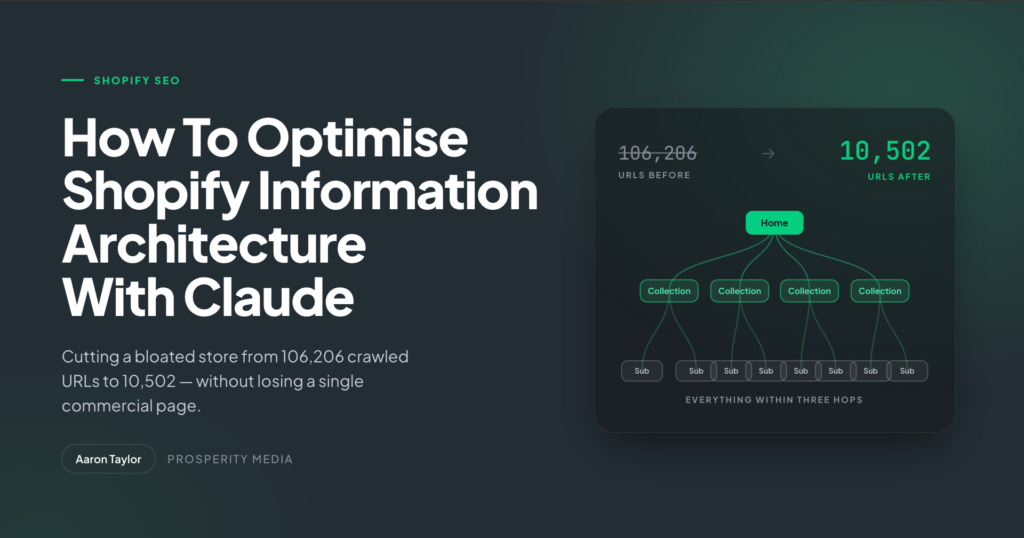
One client came to us with exactly that. 106,206 crawled URLs, the majority of them non-indexable, the crawl map a sea of red. Running them through the IA optimisation process I’m about to walk through, we consolidated that same site down to 10,502 URLs. Roughly a tenth of what we started with, and none of the commercial pages were lost.
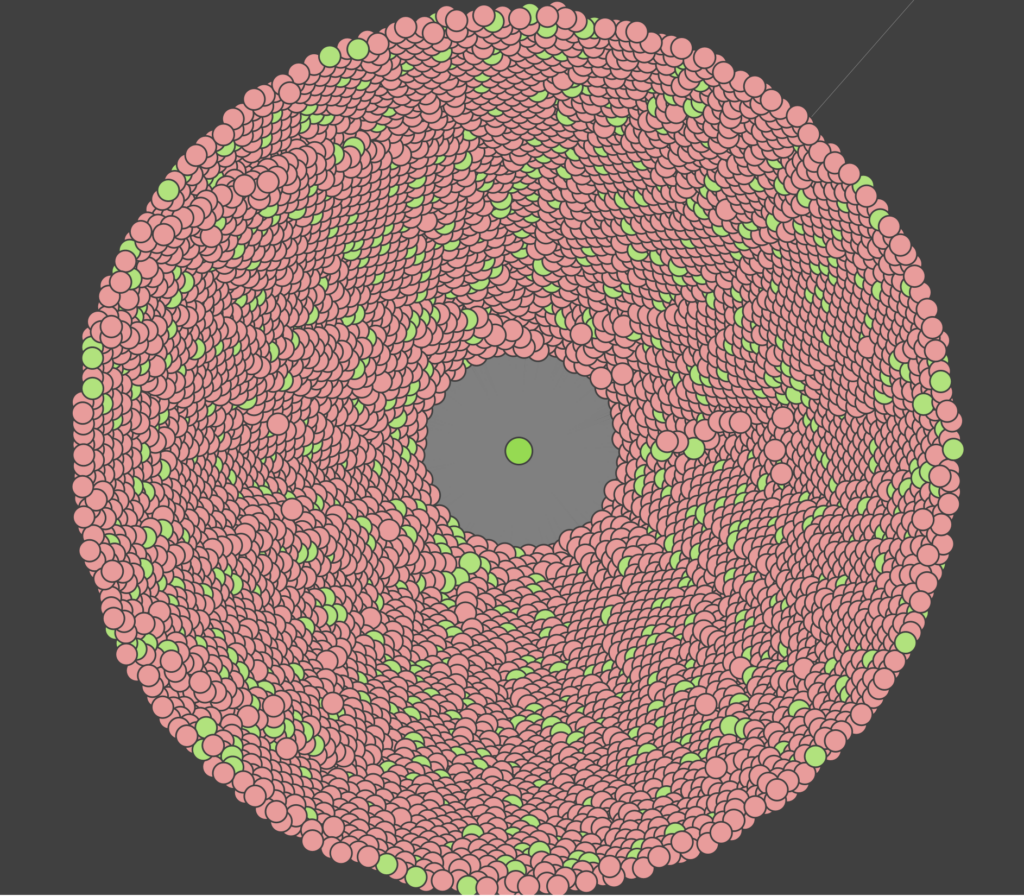
Client’s Shopify Site’s Crawl Path Before IA Optimisation (106,206 URLs)
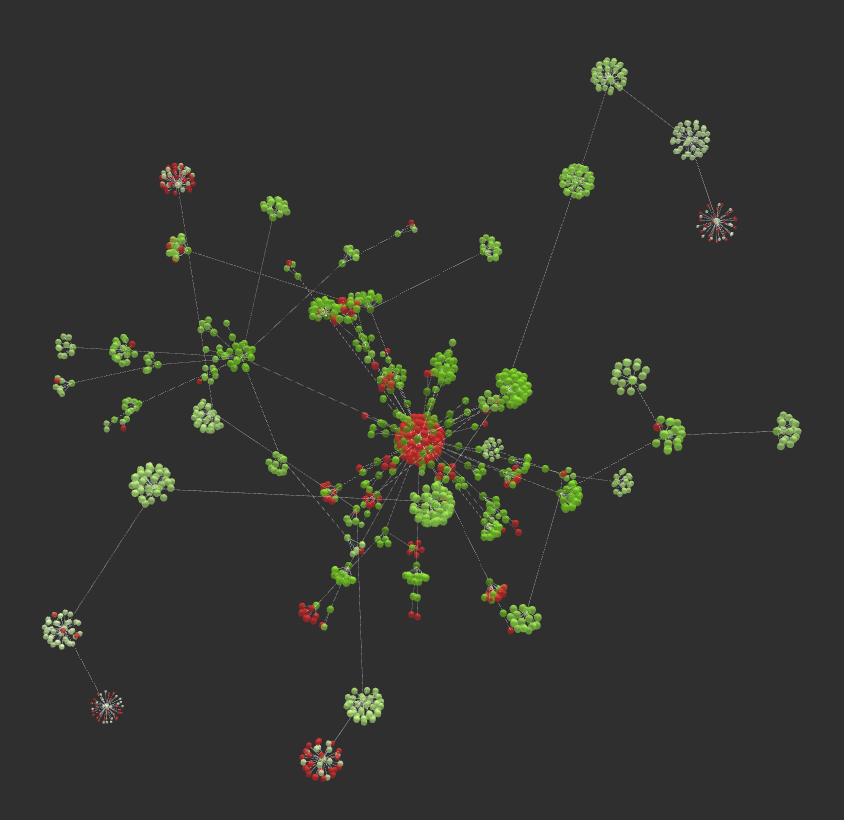
Client’s Shopify IA After Optimisation (10,502 URLs)
This article is that process, end to end. Shopify fundamentals first, then the Claude project setup that makes the rest of it work, then the actual optimisation, and finally how I hand a developer a visualised mega menu brief instead of a spreadsheet and a prayer.
Key Takeaways
- Bloated Shopify IA wastes crawl budget, dilutes link equity and leaves orphaned collections pages earning nothing
- Get the Shopify fundamentals right first – internal linking, breadcrumbs, canonicalisation, pagination – or everything downstream underperforms
- Markdown files are the foundation of the whole workflow; they give Claude business context so you’re not re-educating it every session
- My SEO MCP stack for this is Firecrawl, Ahrefs, SEOGets and Screaming Frog
- Build repeatable processes into Claude Skills so keyword research and competitor analysis run on demand rather than being rebuilt from scratch
- A project that takes 20 to 30 hours manually condenses to 5 to 10, with most of that time spent on QA
- Claude Design and Claude Code turn the mapping into a visualised mega menu your Shopify developer can actually build from
Don’t Want To Read? Here’s my recording for the AI Search & Systems Summit:
And here’s a link to my slides for download.
Why Shopify IA Is Worth The Effort
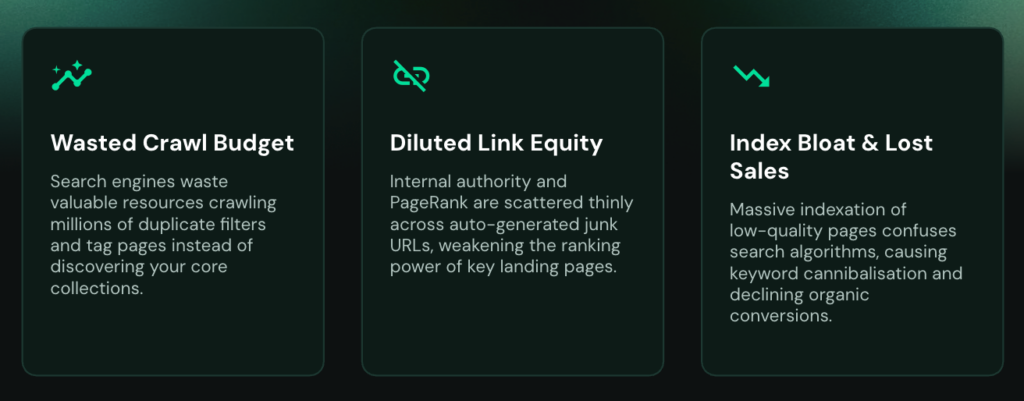
Three things go wrong when the architecture is loose, and they compound.
- Wasted crawl budget: Google allocates a finite amount of crawling resource to each site based on its authority. You do not want to spend that on pages that generate no value and no revenue. Every junk URL is a page Google crawled instead of your new collection.
- Diluted link equity: When duplicate versions of the same page are scattered across the site, internal link and backlink authority gets spread across all of them instead of consolidating into one URL. A tight IA also means equity flows more efficiently through the site rather than pooling in dead ends.
- Index bloat and lost sales: This is the one that actually hurts. If you have sub-collections that aren’t internally linked from your IA, they can’t rank properly – and you’re leaving revenue on the table for terms you already have the products to serve.
If you have a large catalogue, you’re probably already living with some version of this. If you have a small one and you’re planning to grow, laying the groundwork now is dramatically cheaper than untangling it at 100,000 URLs.
Shopify IA Best Practices
Before Claude touches anything, get these right. If the foundations aren’t laid, the rest of the work won’t have its full impact.
- Internally link your sub-collections properly: Every sub-collection should be linked from its primary collection. One of the best places to do this is on the product pages themselves – usually above the fold and the product grid, or as a separate module further down. Link Stacks is a useful Shopify app for doing this at scale. Done well, this keeps everything within three hops of the root domain.
- Apply breadcrumb logic: You want a clean parent-child relationship: collection > sub-collection > product. You can apply the same approach to your blog using its tagging structure.
- Fix your URL canonicalisation: Shopify will happily serve the same product at `/products/` and at `/collections/{collection}/products/`. Link only to the canonical `/products/` version. You can handle this in your Liquid theme file. The upside of a single product URL is that the product can then sit in multiple categories without creating duplicates. Freddie Chatt has a great article on this.
- Use pagination, not infinite scroll: Pagination is far more effective at internally linking to your full catalogue. For a large inventory, set 50 products per paginated page and order them by best sellers first.
- Tag and structure your blog: Give blog posts their own categories and link them from a blog subsection in the mega menu. Roundup listicles of your own products are also a neat way to internally link to products buried deep in pagination and cut their crawl depth.
- Watch for web pixel URLs: I’ve been seeing these explode across Shopify sites lately – tracking tags appended to each page, generating crawlable URLs at scale. Remove the internal links to them site-wide. If you can’t, disallow the string in your robots.txt.
- Watch your review platform: Bazaarvoice is the repeat offender here. It can generate a crawlable, indexable page for every single review left on your products. As your reviews scale, so do these pages – and they can rank and cannibalise the priority canonical pages you actually care about.
Throughout the rest of this article I’ll be using Fenty Beauty AU’s Shopify store as a worked example. It’s Rihanna’s brand, and its IA could do with a bit of a glow up.

My Claude Project Setup
Everything downstream depends on this part. Skip it and you’ll spend the whole project re-explaining the client to Claude.
Markdown Files For Context
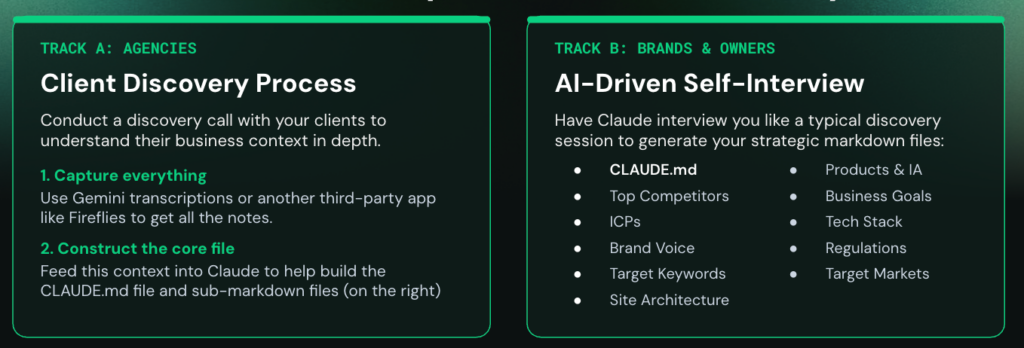
Markdown files are short text files that give Claude persistent context about a business. Set them up once and every future build for that client starts with Claude already knowing who they are.
Agency Track
If you’re agency-side, use your client discovery process.
We run a discovery session at the start of every Prosperity Media engagement covering business goals, SEO history, tech stack and everything around it.
Capture the whole thing – Gemini transcription or a third-party app like Fireflies works fine – then feed the transcript and your summary document into Claude to build out the markdown files, including an optimised `CLAUDE.md`.
I use a “why, how, what” structure for that file, which is worth reading up on separately.
Brand Side Track
If you’re brand-side or you own the store, get Claude to interview you instead.
Have it run a discovery session on you and generate the same files: top competitors, ICPs, brand voice, target keywords, site architecture, products and IA, business goals, tech stack, regulations, target markets.
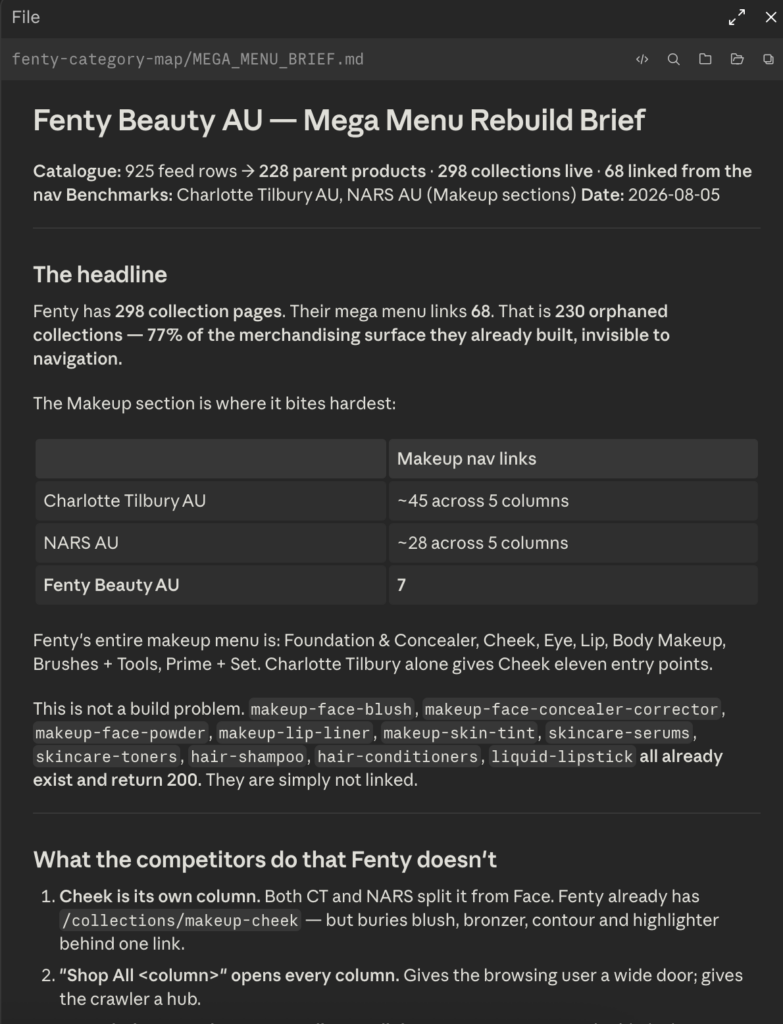
For Fenty I ended up with a mega menu brief, a product-to-category mapping and a competitor selection file. That’s the context layer everything else sits on.
My SEO MCP Stack
MCPs layer on top of the markdown files, so Claude uses the tools with your context rather than in a vacuum. Four I rely on for this workflow:
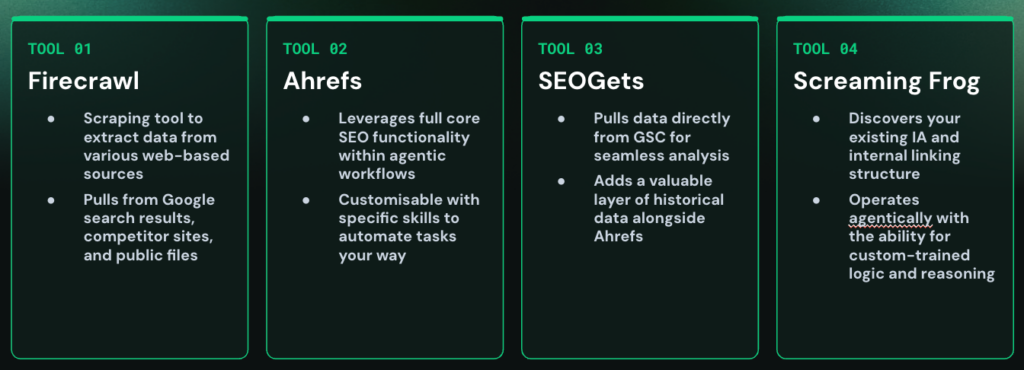
- Firecrawl – web scraping. Google results, competitor sites, and any public file on the web, including the products.json endpoint.
- Ahrefs – full keyword research functionality, and you can wrap your own process around it as a custom skill.
- SEOGets – pulls Google Search Console data and lets you run the analysis you’d normally do by hand.
- Screaming Frog – everything Screaming Frog does, but operating agentically, and trainable with custom logic and reasoning through your markdown files.
Note: if you’re crawling a popular Shopify store, limit it to 1 thread and 1 URL per second so you don’t trigger 429 “too many requests” errors.
Building The Skills
Skills are where the MCPs become repeatable. My way of building them may not be everyone’s, but it works:
- Teach and give feedback: Actually walk through the process with Claude and give it considerable feedback as you go. Don’t describe the process – do it.
- Deploy and polish: Ask Claude to save it as a skill, then read the markdown file it produces and edit anything that doesn’t hold up.
- Tune continuously: When it makes errors later, ask it to update itself. The skill gets better every time you use it.
- Integrate your SOP: If you already have SOPs your team follows, hand them over as markdown. That’s how Claude learns not just to use Ahrefs, but to use Ahrefs your way.
The core skills you’ll need for IA work are keyword research (through Ahrefs) and GSC and scraping analysis (SEOGets plus Firecrawl for products.json).
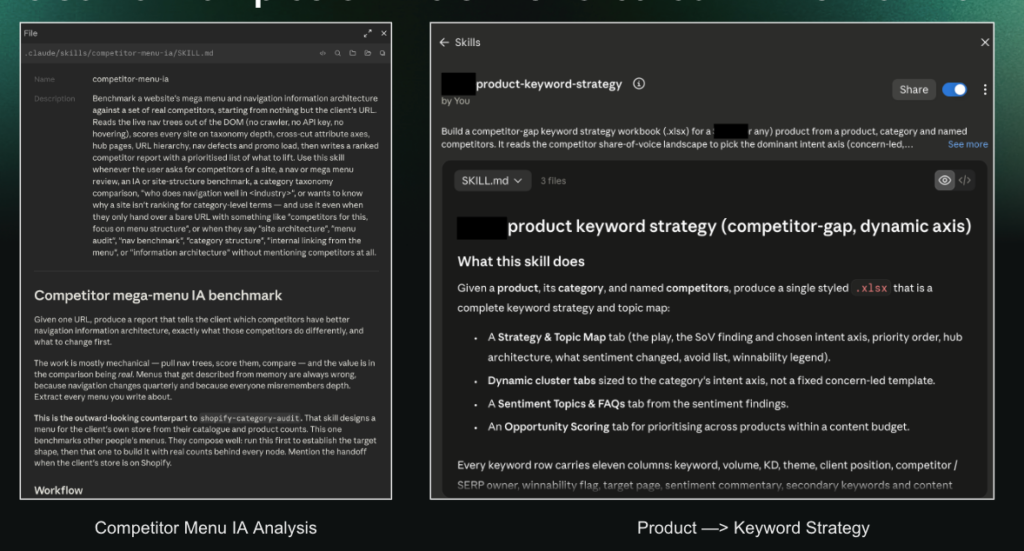
I’ve also built a competitor menu IA analysis skill and a product-to-keyword strategy skill, both of which do a lot of heavy lifting here.
Building An Optimised Shopify IA With Claude
With the project set up, here’s how the tools come together.
Mapping Your Shopify Inventory
The sequence:
- Crawl the products.json file with Firecrawl to get your full Shopify inventory. You can also crawl the collections XML sitemap if you just want a clean list of existing collections pages.
- Crawl the existing IA with Screaming Frog so you know what the internal linking structure actually looks like today, rather than what you assume it looks like.
- Pull historical performance with SEOGets for your collections pages. This is where you find sub-collections you’re already ranking for without targeting – a genuinely useful signal. Segment to your target market, whether that’s AU, US or UK.
- Run keyword research in Ahrefs with your skill, now with full product inventory as context, to find opportunities you’re not covering at all.
Then you create the untapped opportunities, QA them at that stage, map the relevant products to the new collections pages, and finish with competitor benchmarking.
The products.json File
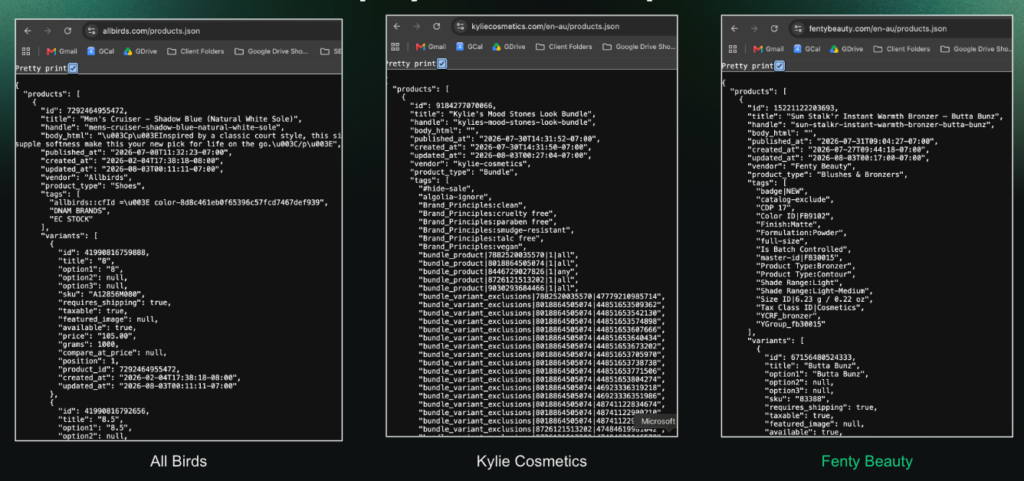
Nearly every Shopify store exposes this endpoint unless it’s been deliberately blocked. Allbirds, Kylie Cosmetics and Fenty Beauty all do.
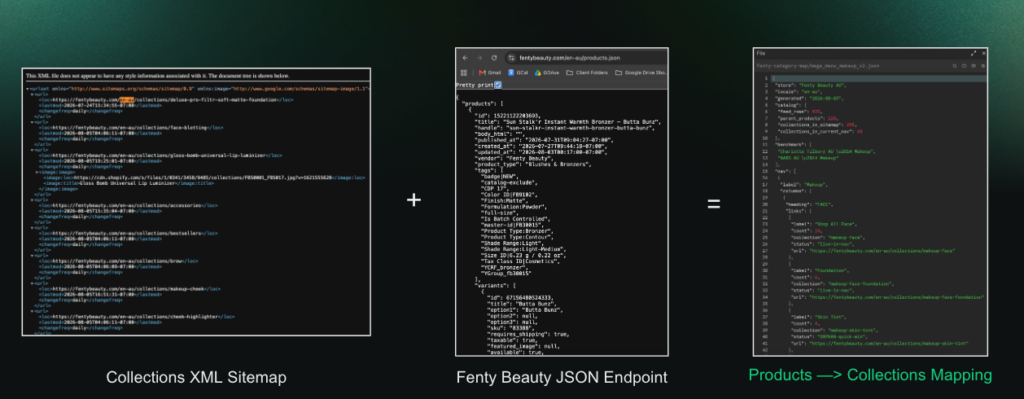
Using Fenty’s endpoint, I built a product-to-collections mapping JSON file in Claude Code by merging products.json with the collections XML sitemap. Sitting alongside the Screaming Frog crawl, that gives Claude a genuinely complete picture of the current structure.
Competitor Best Practice Hijacking
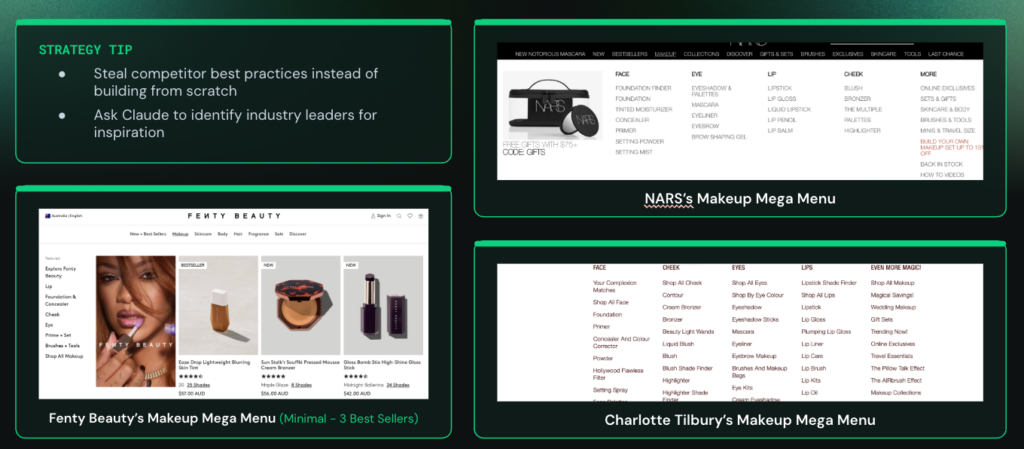
Now go and take what works. Scrape competitor sites with Firecrawl, or just screenshot their mega menus manually and hand the images to Claude – both work, and I’ve built a skill for this process.
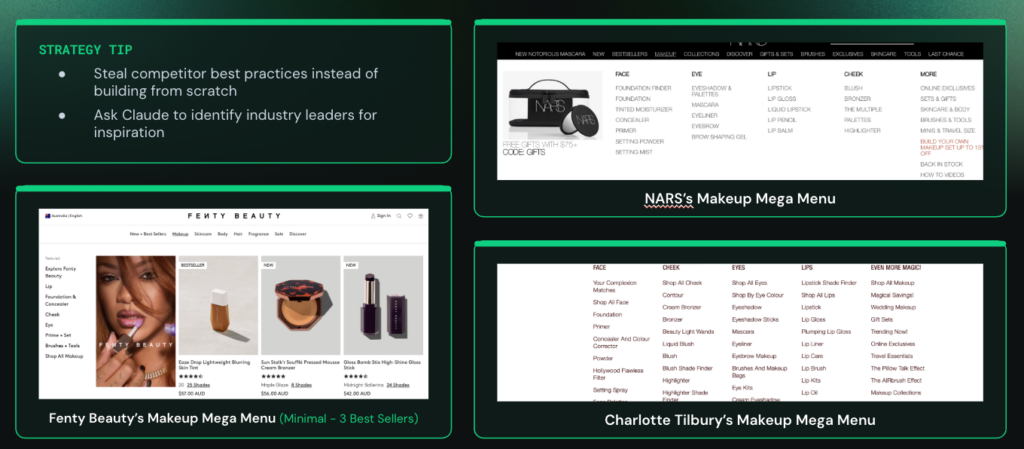
The Fenty comparison makes the point on its own. Their mega menu is thin: a bestseller block, some new arrivals, very few collections. They actually have 69 collections pages, and only a fraction of them appear in the navigation – the rest are effectively orphaned. Put that next to NARS and Charlotte Tilbury, who have built far deeper collection and sub-collection structures, and the opportunity is obvious. Those menus are doing real internal linking work.
Where The Time Actually Goes
A project like this taking 20 to 30 hours manually comes down to 5 to 10. But the honest version of that claim matters: most of your remaining time is spent QAing Claude’s output, not generating it.
If the output isn’t good enough, debug it in this order:
- Check the markdown files – is there enough context?
- Check the skills – are they actually fine-tuned enough to complete the steps properly?
- And then, even if both are perfect, accept that the final layer is you.
- Your SEO expertise and your knowledge of the brand are what sign off the recommendations. That part doesn’t get automated.
Visualising The Mega Menu With Claude Design And Claude Code
The last step is turning all of that mapping into something a developer can build.
Build The Design System First
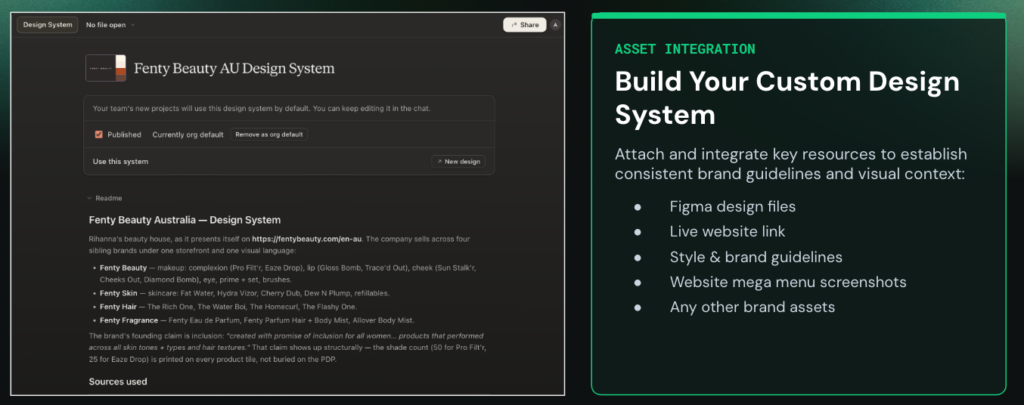
Set up a design system in Claude Design for the brand.
For the Fenty example I had no access to their internal files, so I used their live website link and screenshots of their existing mega menu – and that was enough.
If you do have more to work with, feed in Figma files, style and brand guidelines, and any other brand assets.
Brief It With The Files You’ve Already Made
This is where the earlier work pays off. Feed Claude Design:
- The mega menu brief markdown file
- The mega menu mapping CSV export (new collections pages mapped to products)
- The products/collections mapping JSON file you built from products.json and the collections sitemap
- Screenshots of your own current mega menu, for style
- Screenshots of the competitor mega menus, for best practice
Generate the UI in Claude Design, then import the HTML file into Claude Code if you want to finesse it further.
Before And After
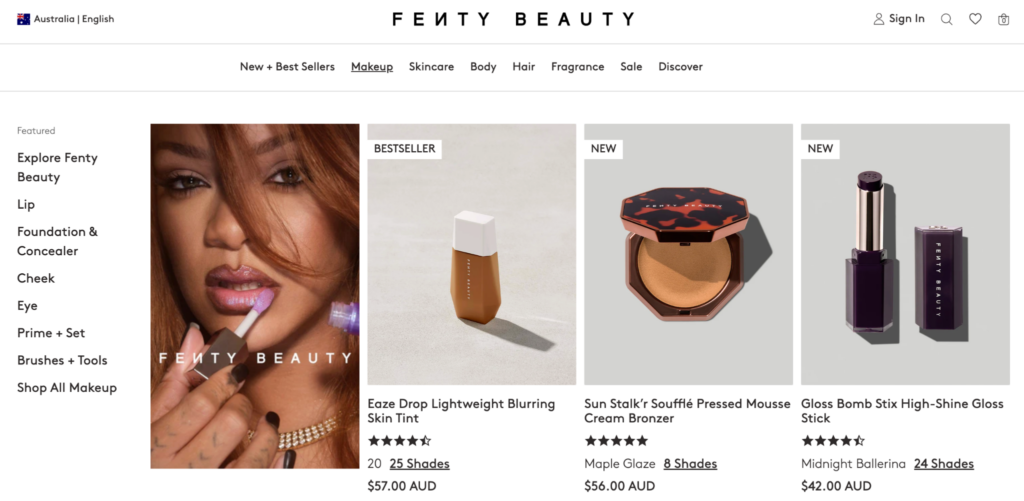
Fenty’s existing menu is sparse – a handful of links and a lot of empty real estate.
The version that came out the other side has a shipping threshold message up top, proper top-level categories like face and cheek, and sub-collections linked underneath each one.
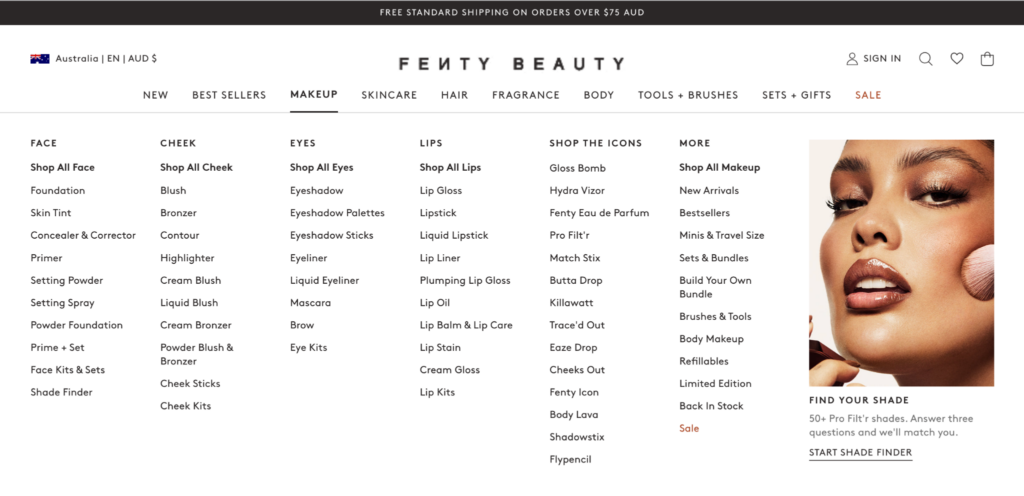
Critically, it links to the previously orphaned collections pages that otherwise would never have been found.
It’s better for SEO. It’s also just better for the person shopping, who can now find what they came for.
Summary
Pulling the whole thing together:
- Establish the Shopify IA fundamentals: Internal linking, breadcrumbs, canonicalisation, pagination, and the parameter and review URLs quietly bloating your index.
- Build context with markdown files: Discovery session or self-interview, then an optimised `CLAUDE.md` and supporting files.
- Create skills and connect MCPs: Firecrawl, Ahrefs, SEOGets and Screaming Frog, wrapped in repeatable skills built on that context.
- Do the competitor research: Gather what best practice looks like in your industry before you design anything.
- Design the UI: Map the desktop and mobile navbar in Claude Design and Claude Code, and brief your developer with a visualisation instead of a spreadsheet.
The thing I’d stress is that none of these steps stand alone – they layer. The design output is only as good as the mapping, the mapping is only as good as the skills, and the skills are only as good as the context you set up at the start. Get the foundations right and the last step almost builds itself.
Your Shopify site’s IA should end up looking a lot cleaner on the other side of this. And your crawl budget will thank you.
If you have any questions, or you want help with your Shopify SEO or GEO campaign, get in touch.
I also post regularly about SEO, AI search and agency operations on LinkedIn – add me there if you’d like a copy of the Shopify Claude skills I built for this workflow.
Here’s another blog post I’ve written about using Claude for SEO and an AI Search White Paper, in case you’re interested:
And happy optimising!
